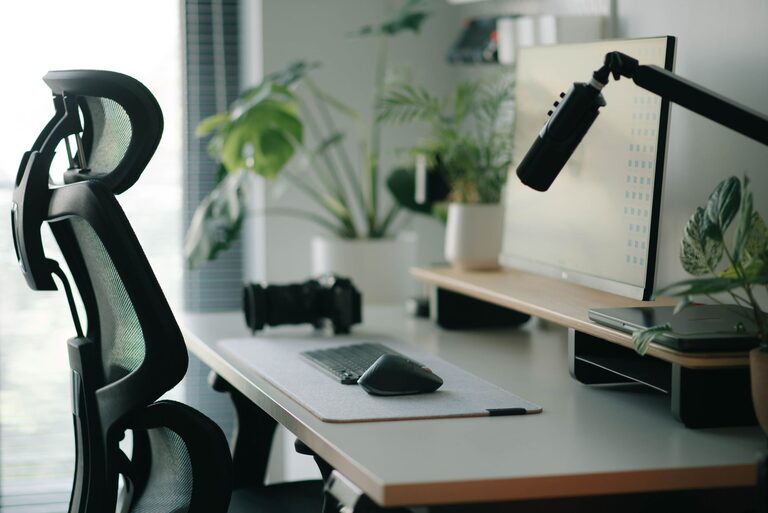
Creating a workspace that promotes both focus and comfort is essential for productivity and overall well-being. Whether you’re working from home or in an office, the way you arrange your desk can greatly impact your concentration and physical health. In this guide, we’ll explore practical tips to design a desk setup that supports your workday with ease and efficiency.
Why Your Desk Setup Matters
Your desk is more than just a surface for your computer and papers—it’s the foundation of your work environment. A well-arranged desk can help reduce distractions, prevent discomfort, and encourage better posture. When your workspace is optimized, you’re likely to stay focused longer and feel less fatigued by the end of the day.
Choosing the Right Desk and Chair
Desk Height and Size
Start by selecting a desk that fits your space and meets your needs. Ideally, the desk height should allow your elbows to be at a 90-degree angle when typing or writing. Most desks are around 28-30 inches tall, but if you’re taller or shorter, consider an adjustable desk or desk risers.
Make sure your desk surface is large enough to hold your essentials without feeling cluttered. This could include your computer, notebooks, a lamp, and perhaps a plant or two for a refreshing touch.
Ergonomic Chair
A comfortable, ergonomic chair supports your lower back and encourages proper posture. Look for chairs with adjustable height, lumbar support, and armrests. Your feet should rest flat on the floor or on a footrest, and your thighs should be parallel to the floor.
Organizing Your Desk for Focus
Declutter Regularly
A cluttered desk can lead to a cluttered mind. Keep only the items you use daily within reach. Store less frequently used items in drawers or shelves to maintain a tidy surface.
Use Organizational Tools
Consider trays, pen holders, cable organizers, and filing systems to keep everything in its place. Clear containers or labeled boxes can make it easier to find what you need quickly.
Positioning Your Essentials
Place your most-used items—like your keyboard, mouse, and notebook—within easy reach to minimize unnecessary movement. Your monitor should be directly in front of you, about an arm’s length away.
Optimizing Lighting
Natural Light
If possible, position your desk near a window to take advantage of natural light. It can boost mood and reduce eye strain. However, be mindful of glare on your screen; use curtains or blinds to adjust brightness as needed.
Task Lighting
Add a desk lamp for focused lighting, especially for reading or writing tasks. Adjustable lamps let you direct light where you need it without creating shadows.
Creating a Comfortable Environment
Temperature and Air Quality
Keep your workspace at a comfortable temperature and ensure good air circulation. A small desk fan or air purifier can help maintain fresh air, which supports alertness.
Personal Touches
Decorate your desk with a few personal items like photos, plants, or artwork. These can make your workspace more inviting, but avoid overdoing it to prevent distractions.
Promoting Good Posture and Breaks
Monitor Placement and Screen Setup
Align the top of your monitor at or slightly below eye level. This position helps you keep your neck in a neutral position. Use a monitor stand if necessary.
Keyboard and Mouse Position
Place your keyboard and mouse close together on the same level to avoid overstretching your arms. Use a wrist rest if you find it comfortable.
Take Regular Breaks
Even with the best setup, sitting for long periods isn’t ideal. Follow the 20-20-20 rule: every 20 minutes, look 20 feet away for 20 seconds to reduce eye strain. Stand, stretch, or walk briefly every hour to keep your body and mind refreshed.
Technology Tips
Cable Management
Tangled cords create visual clutter and can be a tripping hazard. Use cable clips, ties, or sleeves to keep wires neat and out of the way.
Device Placement
If you use multiple monitors or devices, arrange them ergonomically. Avoid turning your head frequently by placing monitors side by side at equal distance.
Noise Control
If you work in a noisy environment, noise-canceling headphones or white noise machines can help you maintain concentration.
Final Thoughts
A desk setup that balances focus and comfort doesn’t have to be complicated or expensive. By choosing ergonomic furniture, organizing thoughtfully, optimizing lighting, and paying attention to your posture, you can create a workspace that boosts your productivity and feels good to use every day. Remember, the best setup is one that fits your unique needs and habits, so feel free to experiment until you find what works best for you.
About the Author